Caching GraphQL POST and QUERY requests: what works, what breaks
Take a bookshop with a GraphQL API. Most of its traffic is reads: the book list on the start page and the page of a single book, requested over and over, while a title or a price changes a few times a day. Each of those reads runs the resolvers and queries the database again for an answer that has not changed. So you look for a cache that takes this repeated work off both the GraphQL server and the database.
In short, a cache for GraphQL POST or QUERY requests has to read the body. It parses the
document to tell queries from mutations, keys each query on its text, operation name and
variables, keeps answers for logged-in users out of shared entries unless the schema marks them
public, and clears cached answers when a mutation changes the data they contain.
The ideas most developers try first, in roughly this order:
- Cache inside the GraphQL server, with a response cache plugin.
- Put a CDN in front and make the requests cacheable: APQ or persisted queries sent as
GET, so the CDN can key on the URL, or your own edge code that reads the body. - Look for a specialized GraphQL edge cache, such as GraphPilot.
An ordinary CDN in front of the bookshop changes nothing, and the next section explains why. After a closer look at these options, you build a small cache from a public repository and run a command for each problem it runs into.
The new HTTP QUERY method (RFC 10008) also
sends a read with a body, so everything here applies to it as well. Caching GraphQL QUERY
requests covers what it changes and what it leaves as it is.
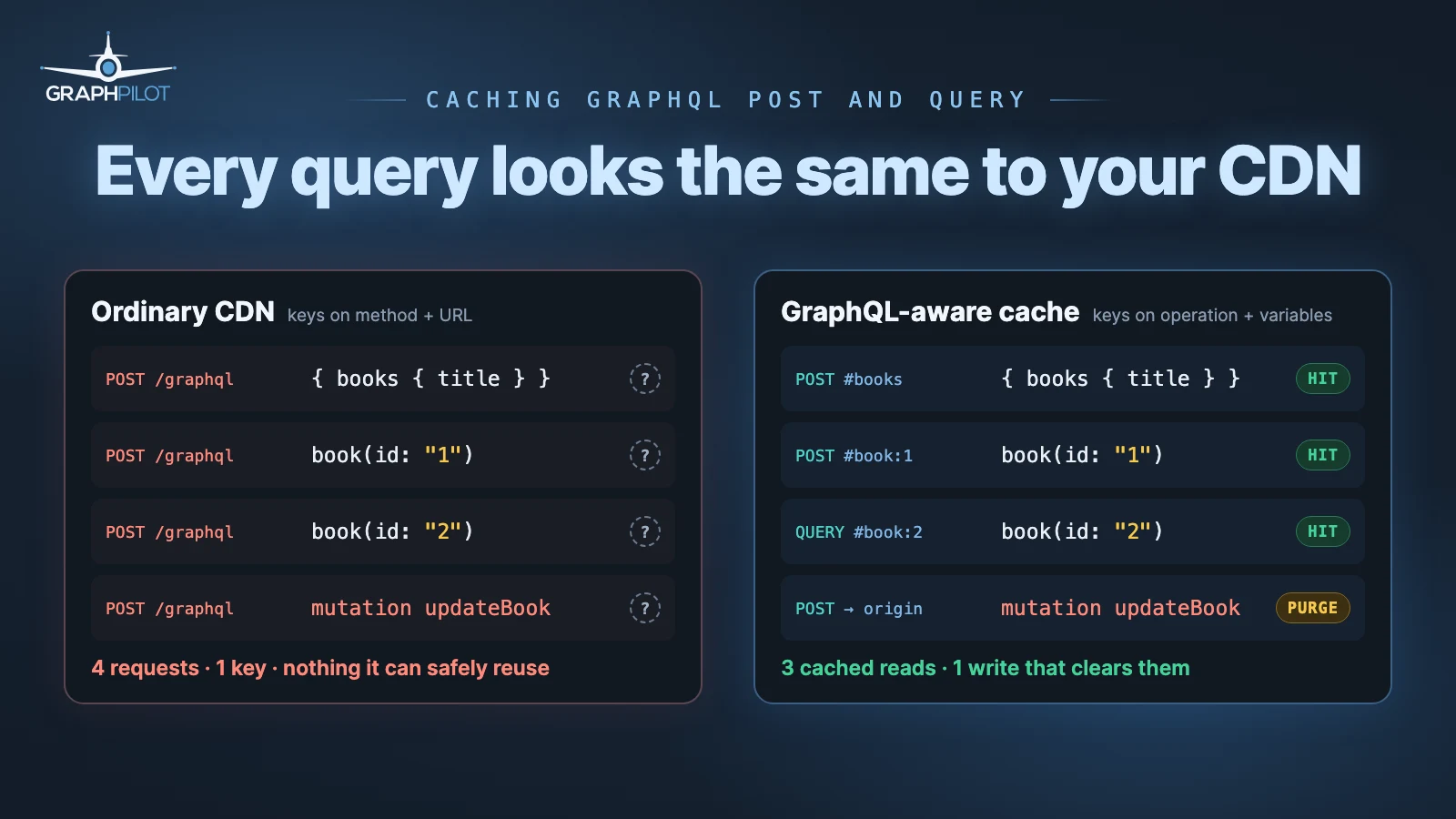
Why a CDN cannot cache GraphQL POST requests
An HTTP cache files a response under a key. RFC 9111
builds the cache key from the request method and the target URI; the request body is not part
of it. For a REST endpoint such as GET /books/1 that is enough: the URL names the resource.
GraphQL moves the query into the body. Every request below goes to /graphql, so to a
URL-keyed cache they are one and the same:
{"query":"{ books { id title author } }"}
{"query":"query BookById($id: ID!) { book(id: $id) { id title } }","variables":{"id":"1"}}
{"query":"query BookById($id: ID!) { book(id: $id) { id title } }","variables":{"id":"2"}}
{"query":"mutation { updateBook(id: \"1\", title: \"New\") { id title } }"}
The HTTP semantics point the same way. RFC 9110
lets a cache store a POST response only when it carries explicit freshness and a
Content-Location equal to the request URI, which GraphQL servers do not send, and even then the
stored response may answer a later GET or HEAD, never another POST. A POST is also allowed
to change things, so a cache that guessed wrong would replay a write.
A URL-keyed cache therefore cannot tell the book list from a single book, or either of them from a mutation that renames a book. The way around it is to move the query into the URL or to make the cache read the body.
Your options for caching GraphQL POST requests
This is how the ideas from the start compare:
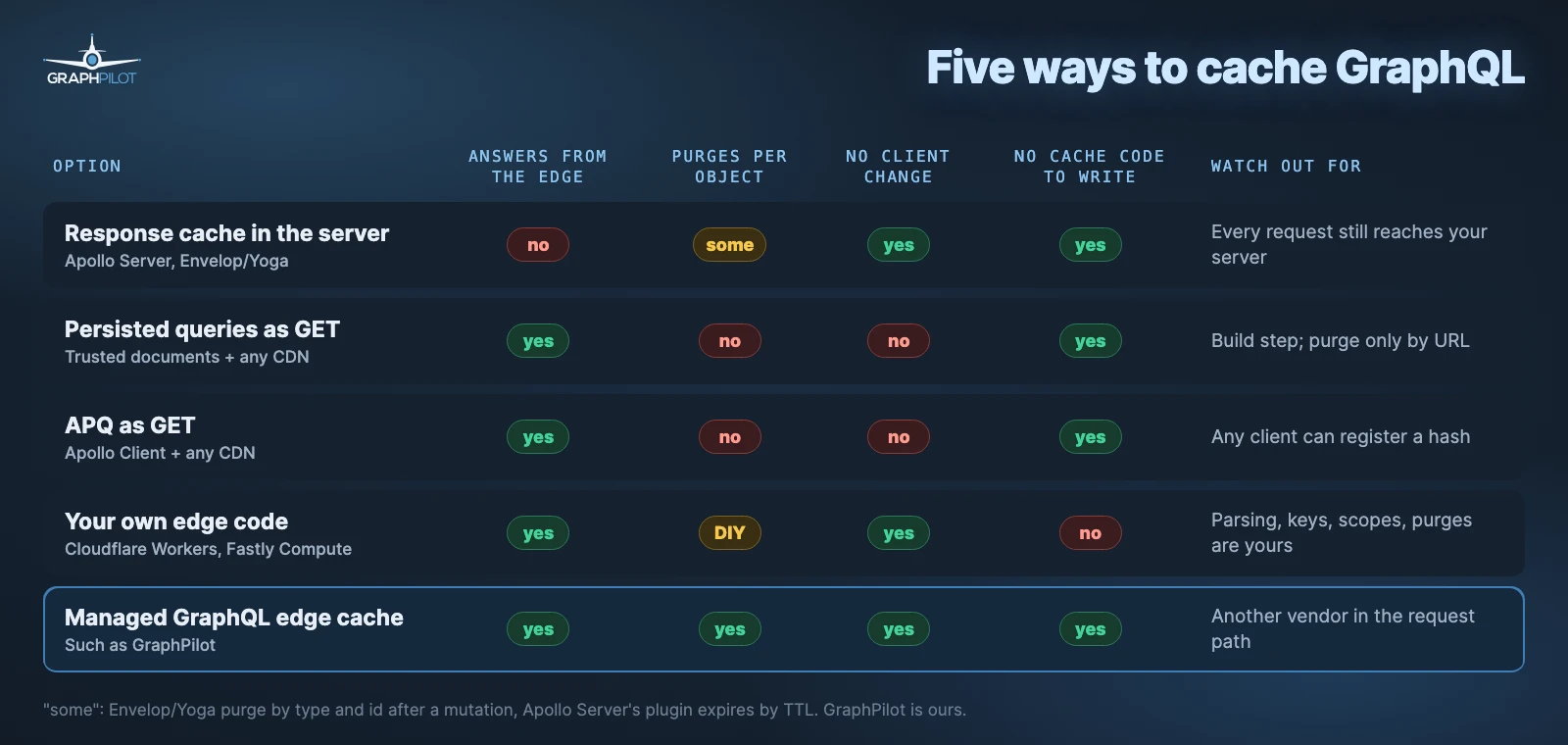
A response cache in the server needs no change to clients. Apollo Server’s
@apollo/server-plugin-response-cache
caches whole responses according to the @cacheControl hints. The Envelop and Yoga
useResponseCache plugin also
invalidates cached results by type and id when a mutation returns that object. Both store in
memory by default and need Redis or a similar store once you run more than one instance. They
save resolver work, but every answer still comes from your server, however far away the user
is.
Persisted queries, also called trusted documents, are registered at build time: the client sends a hash in the URL instead of the document, so any CDN can key on it, and the server can refuse every operation it does not know (Apollo, GraphQL Yoga). Invalidation is limited to expiry or purging a URL, so a changed book stays stale in every list until its TTL runs out.
Automatic persisted queries
skip the build step. The client sends only the hash; if the server does not know it, the server
answers PERSISTED_QUERY_NOT_FOUND and the client retries with the full query, which registers
it. With useGETForHashedQueries in Apollo Client the hashed requests go out as GET and a CDN
can cache them. APQ exists to shrink requests and does not restrict which operations run.
With your own edge code on Cloudflare Workers or Fastly Compute you build what step 3 below
builds: read the body, hash it into the key, and store the response. Cloudflare’s example for
caching POST requests
shows the hashing part and stores every POST, mutations included, so parsing, the operation
type, scopes for credentials and purging after a write are still yours to add.
A managed GraphQL edge cache such as GraphPilot, which is ours, sits in front of your origin, keys on the operation and its variables, and purges the cached responses a mutation has made stale (automatic invalidation). There is no cache code to write, and one more vendor sits in your request path. The purge only follows writes that pass through it: an admin tool talking straight to the database clears nothing on its own.
Data that is different for every user may need no shared cache at all. A normalized client cache in Apollo Client, urql or Relay already avoids repeat requests on one device, and a shared cache would add risk for little gain.
Whichever you pick, the hard parts are the same: telling reads from writes, building the key, keeping private data private and clearing what a write changed. The cache you build below handles each one, so you can see what any of these options has to get right.
The setup: a Book API with a lot of reads
The demo bookshop lives in the graphql-post-caching
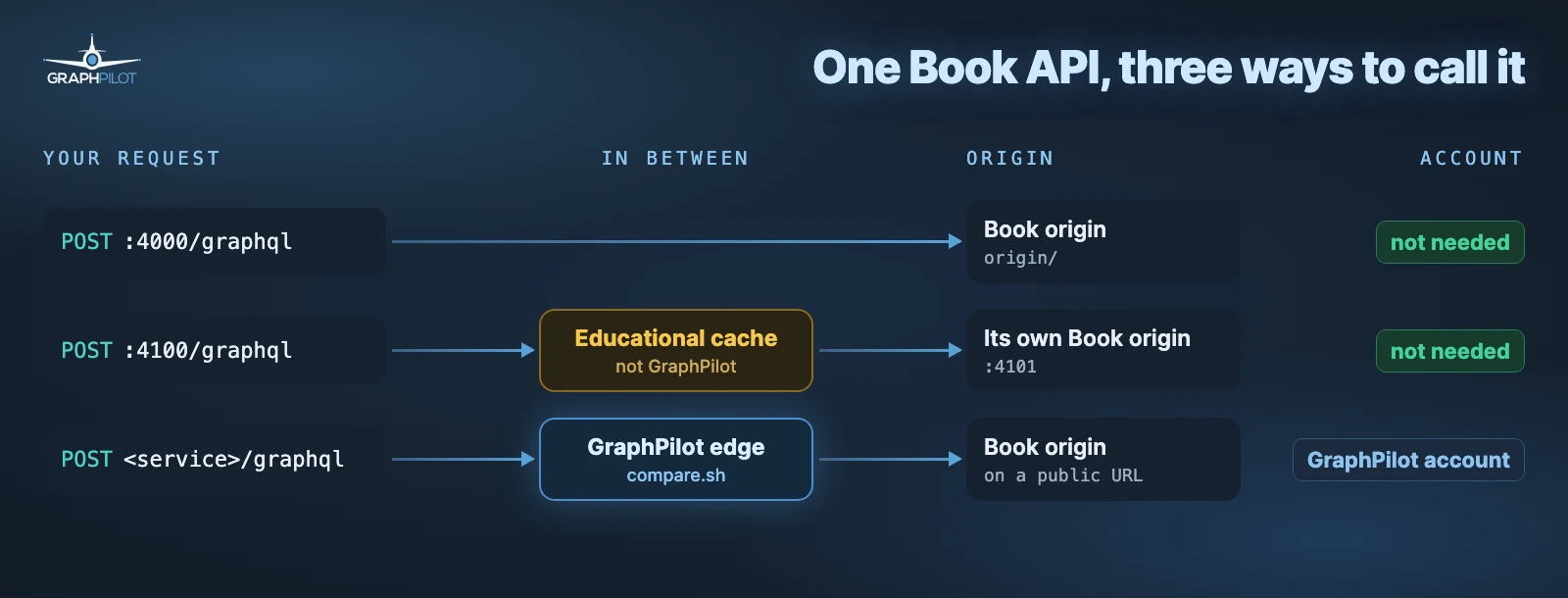
folder of GraphPilot’s examples repository. It has three parts, kept separate on
purpose:
origin/is a GraphQL Yoga server with an in-memory bookshop. It has no cache of any kind.educational-cache/is a hand-written cache that sits in front of its own copy of the origin. It exists to be read and is not production code.graphpilot/holds acompare.shthat runs the same requests against the bare origin and against a GraphPilot service, for the optional comparison at the end.
The schema, from origin/schema.graphql:
type Book @cacheControl(maxAge: 30, scope: PUBLIC) {
  id: ID!
  title: String!
  author: String!
  category: String!
  "Price in cents"
  price: Int!
}

type Query {
  books(category: String): [Book!]!
  book(id: ID!): Book
}

type Mutation {
  updateBook(id: ID!, title: String!): Book!
}
Four books are seeded at start-up, and a restart resets them. The origin sends no
Cache-Control header and ignores the @cacheControl directive; the directive is there for
caches that read the schema, such as Apollo Server’s response cache or a GraphQL edge cache.
Run it on your machine. Everything in this guide works locally with Node.js 22.15 or later, and you need no account:
git clone https://github.com/GraphPilot/examples.git
cd examples/graphql-post-caching
npm install
npm run origin        # the bare origin on http://127.0.0.1:4000/graphql
npm run educational   # the educational cache on http://127.0.0.1:4100/graphql
The origin waits 400 ms before it answers and cache entries live 5 seconds, so a hit is visibly
faster than a miss and an expiry takes seconds to watch; ORIGIN_DELAY_MS and
CACHE_TTL_SECONDS change both. If you type the commands by hand, start it with
CACHE_TTL_SECONDS=30 npm run educational so entries do not expire between two commands. The repository
also ships requests/book-demo.http for the JetBrains and VS Code HTTP clients, and
npm run educational:demo walks through every scenario with curl.
Two shortcuts cover the parts that do not need the educational cache:
- Open in StackBlitz to look at the origin and its schema in a browser tab without installing anything. It runs the origin only, inside your browser, so neither the cache nor GraphPilot can use it.
- Deploy to Render if you want the origin on a public URL, for example to put an edge cache in front of it. It runs on Render’s free plan and needs a Render account. A tunnel from your machine does the same job without one.
Build a cache that reads GraphQL
The cache listens on port 4100, between the client and its own origin. Over five steps it goes from passing requests through to clearing the entries a write has made stale.
1. Send a read
curl -i http://127.0.0.1:4000/graphql \
  -H 'Content-Type: application/json' \
  --data '{"query":"{ books { id title author } }"}'
Run it twice against port 4000 and the origin does the work twice; its log prints
POST /graphql reached the origin for each. Run it twice against port 4100 and the second answer
carries x-cache: HIT. The x-cache headers are the educational cache’s own.
2. Decide what kind of operation it is by parsing it
Checking whether the body starts with query fails both ways. { books { id } } is a query
without the keyword. A document can hold a query and a mutation side by side, and
operationName picks which one runs. A leading comment hides the keyword. Ask the parser
instead:
import { parse, getOperationAST } from "graphql";

function operationType(document, operationName) {
  const operation = getOperationAST(parse(document), operationName);
  return operation?.operation; // "query", "mutation", "subscription" or undefined
}
The educational cache stores nothing unless this returns query. It also validates the document
against the schema and passes anything that fails validation, and
introspection (__schema, __type), straight to the origin
without caching it; x-cache-reason says invalid-document or introspection.
3. Build a key that separates what can differ
A cache key has to tell apart every pair of requests that could get
different answers, and nothing more. For a GraphQL POST the inputs are:
- The operation: which fields, with which arguments.
- The operation name. In a document with several operations,
operationNamepicks the one that runs, so the same document can produce two different answers. - The variables.
book(id: $id)with{"id":"1"}and with{"id":"2"}are two entries. - Any request context the origin reads: the path, a storefront in the hostname, a currency or locale header, a feature flag. If the bookshop’s answer depends on it and the key does not, the German and the US storefront share an entry. Either the key includes it or requests carrying it skip the cache.
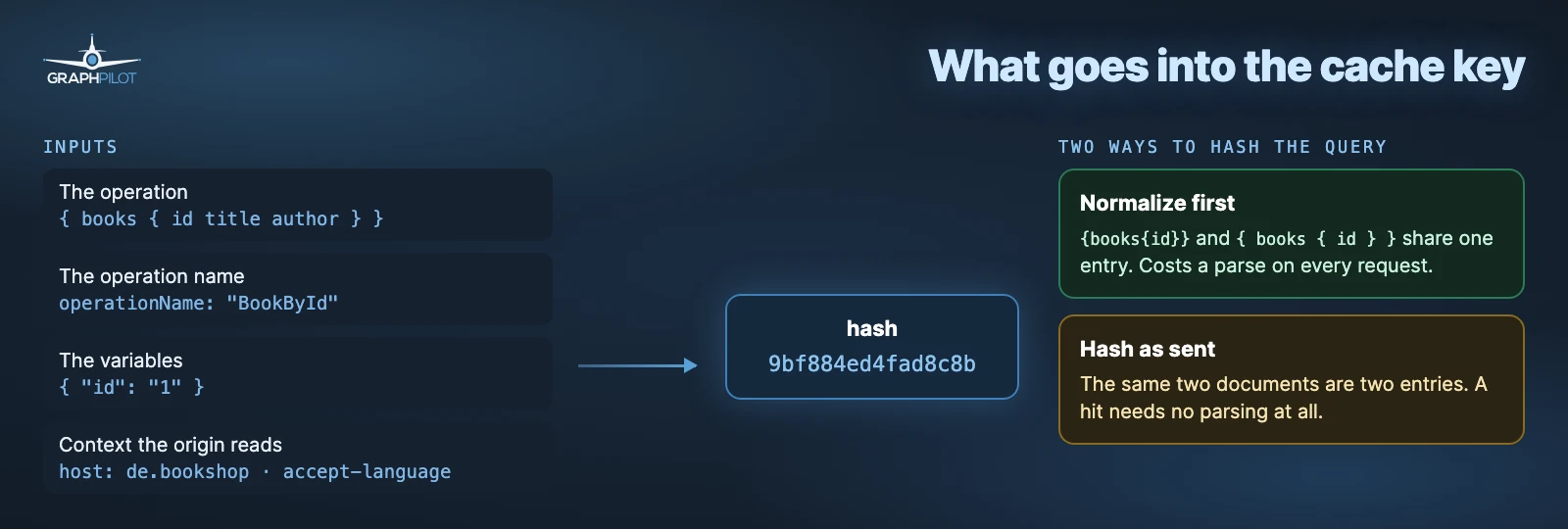
The educational cache takes the first route in the figure, query
normalization: it parses the document, keeps the selected
operation and its fragments, prints it in canonical form and hashes that together with the
coerced variables, the host and the path (educational-cache/cache/key.js).
{books{id title author}} and { books { id title author } } share an entry. The operation name
needs no separate slot, because the printed operation is already the one it selected.
GraphPilot takes the second and hashes the query text exactly as sent (its key
format); the
variables hash ignores member order. Two documents that differ only in whitespace are then two
entries, which costs hit rate when clients format the same operation differently. In return the
key exists before anything is parsed, so a hit costs no parsing at all. This hurts most with clients that send a whole .gql file
and choose the operation by name: editing any operation in that file changes the key of every
other one.
Persisted queries settle the question for both designs. The client sends a hash of a registered operation instead of its text, so every client sending that hash sends the same bytes, and there is nothing left to normalize.
Normalization cannot merge an inline literal with a variable, though. book(id: "1") and
book(id: $id) with {"id":"1"} are different documents and stay two entries in either design,
as problem 2 shows.
4. Store only what is safe to share
A query can still be unsafe to store. The educational cache keeps its rule set short enough to read on one screen; this is its flow in pseudocode:
// Pseudocode of educational-cache: policy first, storage second
if (!isEligiblePublicQuery(request)) return origin(request); // x-cache: BYPASS
const key = buildCacheKey(request);
const hit = cache.get(key);
if (hit && hit.expiresAt > Date.now()) return hit.response; // x-cache: HIT
const response = await origin(request);
if (isSafeToStore(response)) cache.set(key, response); // bounded, LRU
return response; // x-cache: MISS
isEligiblePublicQuery sends anything with an Authorization or Cookie header past the
cache, along with mutations, introspection and any query that selects a field missing from its
allowlist (educational-cache/cache/policy.js). The allowlist is default-deny: a field added to
the schema later is not cached until someone lists it. isSafeToStore refuses a non-200
status, a GraphQL errors array, Set-Cookie, and Cache-Control: private or no-store.
Entries live 5 seconds by default (CACHE_TTL_SECONDS) and the store holds 100 of them
(CACHE_MAX_ENTRIES). The x-cache-reason header names the rule that fired.
A cache serves wrong answers when the response depends on something the key cannot see: who is asking (unless the cache partitions by caller), the current time to the second, a random value, or a side effect the client relies on. For an operation every user runs once, a cache adds nothing.
5. Run a mutation and look at the list
mutation {
  updateBook(id: "1", title: "Updated Book Title") {
    id
    title
  }
}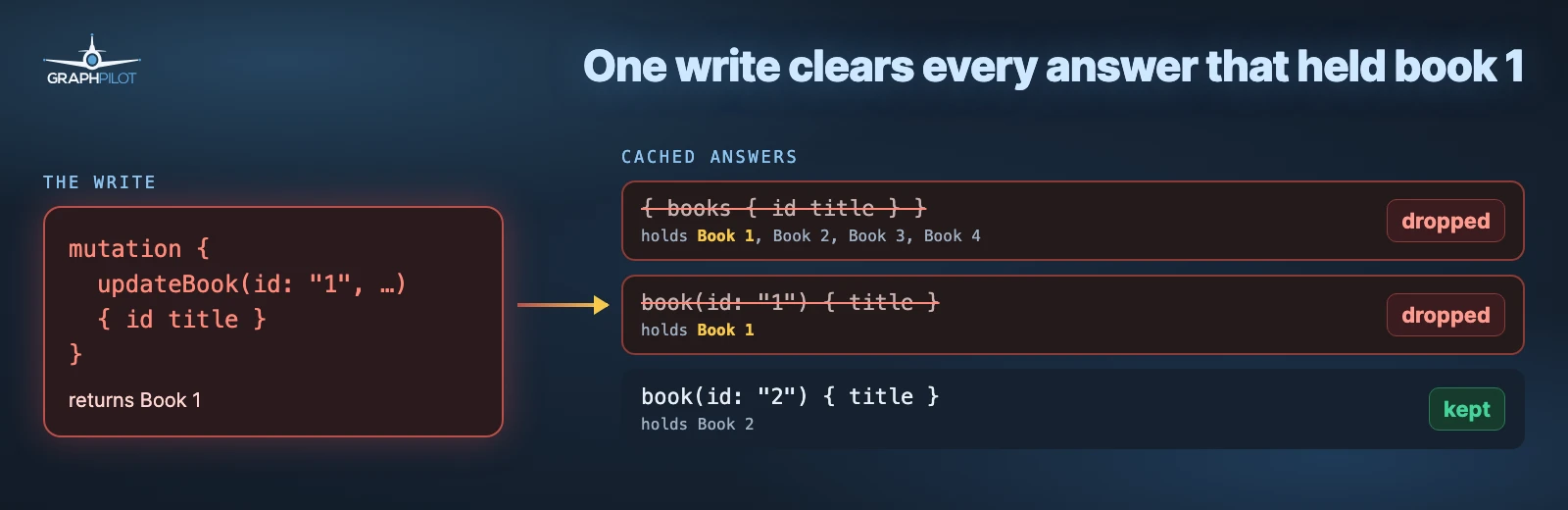
After this mutation, two cached answers hold an old title: book(id: "1") and the books list.
A cache that relies only on its TTL serves both until its TTL runs out. The TTL caps how old
an entry can get; noticing that the data changed takes invalidation driven by the write.
The educational cache reads the Book in the mutation’s response, drops every entry that
contained that id, list included, and reports the count in x-cache-invalidated.
Caches that do this at scale use the same idea with surrogate
keys: each response is tagged with a key per object in it, such
as Book:id:1, and a write purges every response that carries the key.
Neither cache can clear a list that never held the object. A create adds a book that is in no
cached response yet, so its key reaches nothing, and a books list cached a second earlier keeps
showing the old books. The usual fix is one extra key on the list field itself that every create
purges. The demo has no create mutation, so you will not run into it here, but most real
APIs do. Why you can’t just put a CDN in front of GraphQL
goes into why a generic CDN cannot infer any of this on its own.
Five problems you will run into
The bookshop now has a cache that answers repeat reads. Hand-built GraphQL caches usually go wrong in the five places below, and each one comes with commands you can run against the educational cache to watch it happen.
The outputs are condensed to one line per request. Your keys will match ours; your timings will not.
To print only the interesting headers, define this once:
URL=http://127.0.0.1:4100/graphql
req() { curl -sS -o /dev/null -D - -w 'time_total=%{time_total}\n' "$URL" \
  -H 'content-type: application/json' "$@" | grep -iE '^(x-cache|age|time_total)'; }
Problem 1: the same query, written differently
What it tests: that an identical POST is answered from the cache the second time.
req --data '{"query":"{ books { id title author } }"}'
req --data '{"query":"{ books { id title author } }"}'
req --data '{"query":"{books{id title author}}"}'
x-cache: MISS x-cache-key: 9bf884ed4fad8c8b x-cache-ttl: 5 time_total=0.449
x-cache: HIT x-cache-key: 9bf884ed4fad8c8b x-cache-ttl: 5 age: 0 time_total=0.003
x-cache: HIT x-cache-key: 9bf884ed4fad8c8b x-cache-ttl: 5 age: 0 time_total=0.003The third request has no spaces and still hits, because this cache normalizes the document before hashing it. A cache that hashes the text as sent (step 3) would store it as a separate entry. If your clients do not send byte-identical documents, that difference decides your hit rate.
Problem 2: variables and inline values
What it tests: that variables are part of the key, and what the operation name does.
Q='query BookById($id: ID!) { book(id: $id) { id title } }'
req --data "{\"query\":\"$Q\",\"variables\":{\"id\":\"1\"}}"
req --data "{\"query\":\"$Q\",\"variables\":{\"id\":\"2\"}}"
req --data "{\"query\":\"$Q\",\"variables\":{\"id\":\"1\"}}"
req --data '{"query":"{ book(id: \"1\") { id title } }"}'
x-cache: MISS x-cache-key: 3b21d1951c9d86b1
x-cache: MISS x-cache-key: e20824722af7cec0
x-cache: HIT x-cache-key: 3b21d1951c9d86b1
x-cache: MISS x-cache-key: 448613b71adbc3dbId 1 and id 2 get their own entries, and id 1 hits on the way back. The last request asks for the same book with an inline literal and misses: the data is the same, the document is not.
One document can also hold two operations, and operationName picks the one that runs:
query A { books { id } }
query B { book(id: "1") { id title } }
Sent once with operationName: "A" and once with "B", it gave two entries in our run, keys
5b5854d1… and 77005afc….
Problem 3: data that changes behind the cache’s back
What it tests: that an entry stops being served when its lifetime runs out.
B='{"query":"{ books { id title author } }"}'
req --data "$B"; sleep 3; req --data "$B"; sleep 3; req --data "$B"
x-cache: MISS x-cache-ttl: 5 time_total=0.409
x-cache: HIT x-cache-ttl: 2 age: 3 time_total=0.002
x-cache: MISS x-cache-ttl: 5 time_total=0.408age counts up and x-cache-ttl counts down, and after five seconds the origin is asked
again. A TTL is the only freshness guarantee a cache has for changes it never sees, such
as an admin tool writing straight to the database.
Problem 4: a write that leaves stale answers behind
What it tests: that a write clears every cached answer containing the object it changed, including the list.
req --data "$B"   # cache the list
req --data '{"query":"mutation { updateBook(id: \"1\", title: \"Updated Book Title\") { id title } }"}'
req --data "$B"
x-cache: MISS
x-cache: BYPASS x-cache-reason: mutation x-cache-invalidated: 5
x-cache: MISS (book 1 now reads "Updated Book Title")The mutation removed five entries in our run, every stored response that contained book 1,
whatever its shape: the list, book(id: "1") with a variable and with a
literal, and the operations from the operationName test. Your count depends on what you ran
before. The next read of the list is a miss and shows the new title, without waiting for any
TTL. Restart the educational cache to get the original title back.
Problem 5: logged-in users
What it tests: what the cache does with a request that carries a credential.
req -H 'authorization: Bearer demo' --data "$B"
req -H 'cookie: session=abc' --data "$B"
x-cache: BYPASS x-cache-reason: authenticated time_total=0.406
x-cache: BYPASS x-cache-reason: authenticated time_total=0.412The educational cache neither stores nor serves anything for a request with Authorization or
Cookie, because it cannot know whether the answer was computed for that caller. The Book origin
ignores both headers, so nothing here could leak; the command only shows the policy.
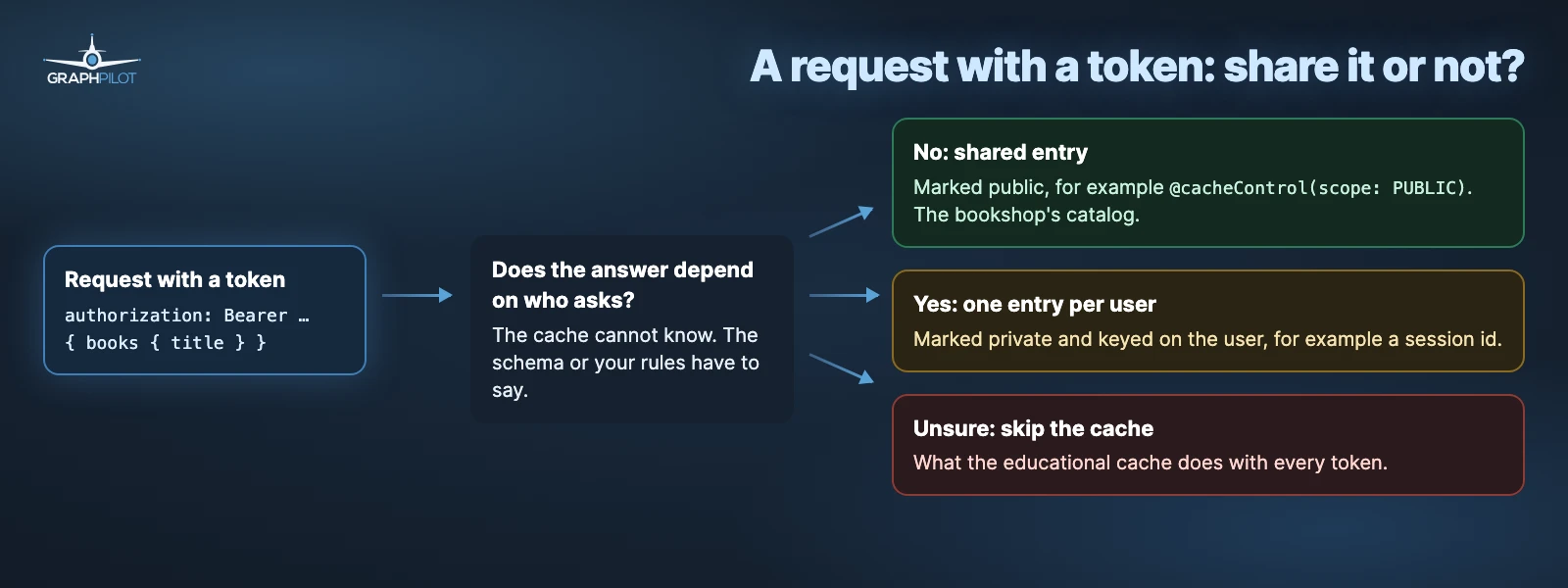
Caches that read @cacheControl decide by the schema instead of the header. In Apollo Server’s
response cache a PUBLIC
response is shared by every caller, and a PRIVATE one is only cached per session when you
configure a session id. The demo’s Book is scope: PUBLIC, which is correct for a bookshop;
data that differs per user or per tenant has to be marked as such in the schema.
Try an edge cache on the same demo
If you want to watch an edge cache handle the same requests, graphpilot/compare.sh in the
repository runs them against the bare origin and against a GraphPilot service, and prints the
gp-cache status of each step. It needs the origin on a public URL (Render or a tunnel) and a
service set up as in the quickstart.
The step to look for is the one that changes a book directly at the origin: no cache in front can
see that write, so the old title stays until the entry expires or you purge it.
Caching GraphQL QUERY requests
RFC 10008, published in June 2026, defines
QUERY: a safe, idempotent method that carries a body. For GraphQL that is the missing
combination, and the RFC says the request content belongs in the cache key, which is what
step 3 had to build by hand.
QUERY /graphql HTTP/1.1
Content-Type: application/json

{"query":"{ books { id title author } }"}
GET | POST | QUERY | |
|---|---|---|---|
| Safe and idempotent | Yes | No | Yes |
| Request body | No; the operation goes in the URL | Yes | Yes |
| Reusable by a shared HTTP cache | Yes, keyed by URL | Practically no | Allowed, if the cache keys on the body |
| GraphQL over HTTP draft | Optional for servers | Required for servers | Not defined |
| May carry a mutation | Must not | Yes | Must not |
Support is another matter:
- The GraphQL-over-HTTP draft requires servers to accept
POSTand treatsGETas optional. It does not defineQUERYyet; a proposal to add it is open. - GraphQL Yoga, the server in this demo, answers
QUERYwith405. Opt-inQUERYsupport was merged on 2026-11-11 and is not in a release yet; it rejects a mutation sent asQUERYwith405. - On CDNs: RFC 10008 makes a
QUERYresponse cacheable, and the cache key must include the request body. We found no documentation from Cloudflare, Fastly, Akamai or Amazon CloudFront that cachesQUERYthat way out of the box. For Cloudflare Workers’ Cache API it is an open feature request. Until that changes, a CDN either passesQUERYthrough uncached or needs edge code that hashes the body into the key, the same work step 3 does forPOST. - Every client, proxy, load balancer and server on the path has to let the method through. Node.js, Envoy and most web frameworks accept it; NGINX support is still a pull request.
The educational cache accepts QUERY for reads, keys it like the same POST and forwards it to
the origin as POST. Send the book list as POST twice, then as QUERY:
for m in POST POST QUERY; do
  curl -sS -o /dev/null -D - -X "$m" http://127.0.0.1:4100/graphql \
    -H 'content-type: application/json' \
    --data '{"query":"{ books { id title author } }"}' | grep -i -e '^x-cache:' -e '^x-cache-key:'
  echo --
done
x-cache: MISS
x-cache-key: 9bf884ed4fad8c8b
--
x-cache: HIT
x-cache-key: 9bf884ed4fad8c8b
--
x-cache: HIT
x-cache-key: 9bf884ed4fad8c8b
--The QUERY has the same key as the POST and is answered from its entry. A mutation sent as
QUERY is refused before it reaches the origin:
HTTP/1.1 405 Method Not Allowed
allow: POST
x-cache: BYPASS
x-cache-reason: unsafe-operation-over-query
GraphPilot, our own service, also keys a QUERY like the same operation sent as POST. On its
public demo edge, which serves a product catalog rather than the Book API, a POST filled an
entry and the same body sent as QUERY was answered from it, with gp-cache: HIT and
gp-cache-hits: 2 on the QUERY. A QUERY that misses goes to the origin
as QUERY unless the service sets origin.method_rewrite = "query_to_post" (configuration
reference).
QUERY leaves invalidation where it was. It tells a cache that a read is a read and that the
body belongs in the key, but nothing about which cached answers a later mutation has made wrong.
Before you turn a shared cache on
Whatever you put in front of your API, test these points with real requests before you look at response times:
- Only queries are cached. Mutations and subscriptions always go to your server, and so do
introspection queries (
__schema,__type). - Two requests that can get different answers never get the same cache key. Besides the query and its variables, that includes anything else your server reads, such as the storefront in the hostname or the language header.
- Data for logged-in users never ends up in a shared entry, unless your schema says it is the same for everyone. Otherwise the cache skips the request or keeps one entry per user.
- Error responses are not cached: answers with GraphQL
errors, with aSet-Cookieheader or withCache-Control: no-storestay out. - The cache has a size limit, so it cannot grow until it runs out of memory.
- After an update, every cached answer that contains the changed book is gone, the book list included. You also know what clears a cached list after a new book is created.
- If you want clients to use
QUERY, every proxy and server on the way accepts it.
See it in under a minute
How a write clears the right answers, why a new book can miss a cached list, and who may see which answer.
Frequently asked questions
- Should GraphQL clients switch to the HTTP QUERY method?
- Not by default yet. RFC 10008 standardized QUERY in June 2026, but the GraphQL-over-HTTP draft does not define it yet (a proposal is open), GraphQL Yoga only gained opt-in support in November 2026, and no major CDN documents caching QUERY keyed on the request body out of the box. Every client, proxy and server on the path also has to let the method through. QUERY also changes nothing about invalidation: a cached read still has to be cleared when a mutation changes its data.